What is PowaAgent
PowaAgent lets your AI agent pay for data and APIs on its own, one call at a time. It pays from a wallet you own, within rules you set.
When your agent calls a paid API, the API asks for a small payment first. PowaAgent checks the call against your source policy, signs the payment from your wallet, and your agent gets its answer. Every payment appears in your portal.
How it works
- Create a PowaAgent account at portal.powaagent.ai. PowaAgent creates a wallet for you on Base, a public blockchain network. The wallet holds USDC, a digital dollar.
- Give PowaAgent permission to sign payments from that wallet. The permission lasts 10 years unless you revoke it, and you can revoke it from your dashboard at any time.
- Add funds by card or bank through Coinbase, or by sending USDC on Base to your wallet address.
- Connect your agent with the PowaAgent connector (an MCP server) or the PowaAgent Skill.
- Let your agent work. Each paid call is checked against your source policy before PowaAgent signs it.
Coinbase holds your wallet key in a secure enclave. PowaAgent never sees it, and you can export your recovery key at any time from Settings.
What your agent can buy
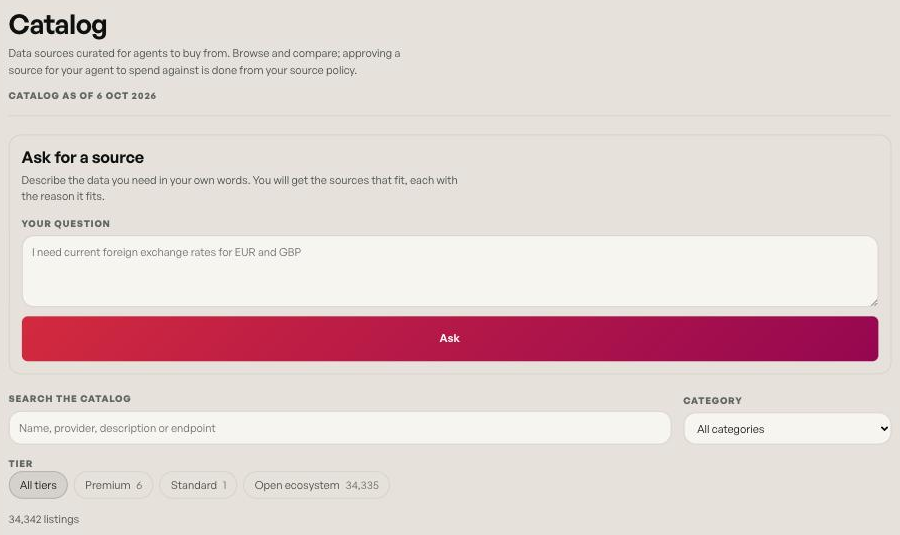
Your agent buys from the catalog, which holds every endpoint in the ecosystem, in three tiers:
- Premium. Verified endpoints. Premium is always allowed.
- Standard. You can allow or block Standard endpoints in your source policy.
- Open Ecosystem. Any other API that accepts payment in USDC on Base using the open x402 standard, including the APIs listed in the public x402 Bazaar. You can allow or block Open Ecosystem endpoints in your source policy.
You can browse the full catalog on the portal's Catalog page and at powaagent.ai/data. See Source trust tiers and Open Ecosystem.
What you control
From your portal you decide:
- How much your agent can spend: per call, per 24 hours and per 30 days.
- Which sellers it can pay: Premium is always allowed. Standard and Open Ecosystem can each be switched off.
- Exactly which sellers are allowed or blocked, with allow and deny lists. When the allow list is on, unknown sellers wait for your approval.
- Whether PowaAgent can sign at all. Revoke access in one click, and renew it when you want.
See Source policy.
What it costs
Creating an account is free. You pay for the calls your agent makes. You pay the price the seller publishes. PowaAgent adds nothing to it.
Next steps
- Quickstart: from sign-up to your first paid call.
- Connect an MCP client: connect Claude, ChatGPT and other assistants.
- Install the PowaAgent Skill: for agents that read skills.
Help
Stuck? Email us at hello@powaagent.ai.