Fund your wallet
Your agent pays from your PowaAgent wallet. The wallet holds USDC, a digital US dollar, on the Base network. You can add money in two ways.
Is your country on the Coinbase list?
Your PowaAgent wallet (USDC on Base)
Option 1: Buy with card (Coinbase)
This is the easiest way. Coinbase sells you USDC and sends it straight to your wallet.
- In the portal, open Funding.
- Under Buy with card or bank, choose Open Coinbase Onramp.
- Pick an amount in US dollars. Use a preset ($50, $100 or $250) or type your own.
- Choose Continue to Coinbase. Coinbase opens in a new tab.
- Sign in to Coinbase, or create an account. Coinbase checks your identity.
- Pay. When you come back, choose Refresh to see your new balance.
Payments usually clear in 2 to 5 minutes.
Countries where you can pay by card
Coinbase decides who can buy and how. This list was checked on 9 October 2026 and can change.
| Where | How you can pay |
|---|---|
| United States | Debit card, bank account (ACH), Apple Pay or your Coinbase balance |
| United Kingdom, European countries, Canada, Australia, Singapore, Brazil | Debit card or your Coinbase balance |
| New Zealand | Debit card |
Full list (45 countries):
- Europe: Andorra, Austria, Belgium, Bulgaria, Croatia, Cyprus, Czechia, Denmark, Estonia, Finland, France, Germany, Gibraltar, Greece, Guernsey, Hungary, Iceland, Ireland, Isle of Man, Italy, Jersey, Latvia, Liechtenstein, Lithuania, Luxembourg, Malta, Monaco, Netherlands, Norway, Poland, Portugal, Romania, San Marino, Slovakia, Slovenia, Spain, Sweden, Switzerland, United Kingdom.
- Americas: Brazil, Canada, United States.
- Asia-Pacific: Australia, New Zealand, Singapore.
Not on the list? In many other countries, Coinbase only lets you pay with crypto you already hold at Coinbase. If card payments don't work for you, the button reads Not available in your region. Use Option 2 instead. See Fund your wallet from other countries.
Option 2: Send USDC to your wallet
You can send USDC from any exchange or wallet. Your wallet address is on the Funding page, with a QR code. It is also on your Dashboard under Your wallet.
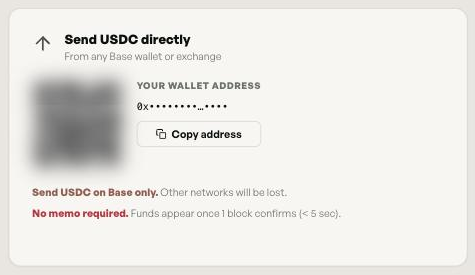
Send USDC on Base only. If you send on any other network, the money will be lost.
Before you send:
- Choose Base as the network.
- Send USDC, not another token.
- Send a small amount first to check it arrives.
Step-by-step help for each country: Fund your wallet from other countries.
How much to add
You only pay for the calls your agent makes. Each seller publishes its own price per call. Your source policy limits how fast the balance can be spent.
Taking money out
The portal doesn't have a withdraw option. Your wallet belongs to you: you can export its recovery key from Settings → Security and use it in another wallet. See Agent access and account security.
Test funds
To try PowaAgent without real money, use the sandbox. It runs on Base Sepolia with test USDC that PowaAgent provides. See Sandbox testing.