Agent access and account security
Agent access
When you created your wallet, you gave PowaAgent permission to sign payments from it for 10 years, unless you revoke access. The Agent access card on your Dashboard shows whether that permission is Active and the date it ends.
Revoke access
- On the Dashboard, choose Revoke on the Agent access card.
- Confirm Revoke wallet access.
PowaAgent can no longer sign payments for you, so every paid call your agent makes will fail. Your wallet and its funds stay yours.
Renew access
Choose Renew access on the Agent access card. This gives PowaAgent signing permission again.
Recovery key
Your wallet key is held by Coinbase in a secure enclave. You can export a recovery key that controls the wallet directly, for example to move your funds to another wallet.
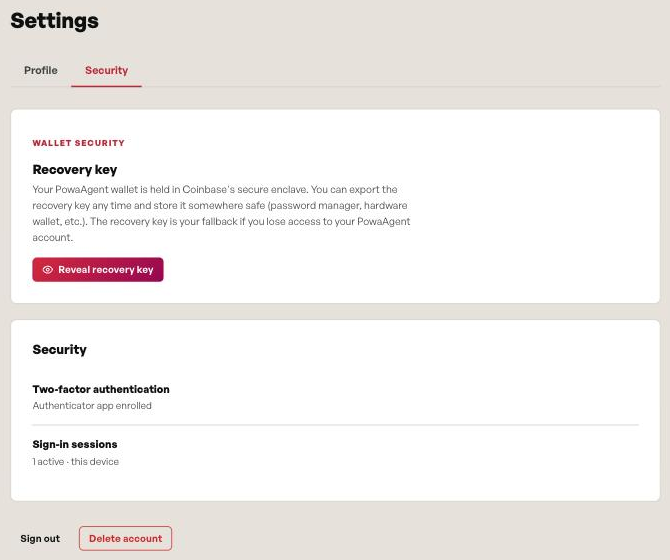
- Go to Settings → Security.
- Under Recovery key, choose Reveal recovery key.
- The key is shown in Coinbase's secure export panel.
Anyone with this key can move your funds. Never share it, and store it somewhere safe.
Two-factor authentication
Every PowaAgent account uses two-factor authentication with an authenticator app, set up when you create the account. Settings → Security shows that an authenticator app is enrolled.
Profile
Under Settings → Profile you can change your first name, last name and country (a two-letter ISO code). Your email address can't be changed here.
Delete your account
Under Settings → Security, choose Delete account and confirm.
This permanently deletes your PowaAgent account and all associated data, and it can't be undone. Before you delete it, move any funds out of your wallet using your recovery key.
If an API key leaks
Revoke the key on the API key page, then create a new one. If you think your account itself is at risk, revoke agent access first. See API keys.