API keys
An API key lets an agent or MCP client use your PowaAgent account when it can't sign in with OAuth. You need one for the PowaAgent Skill's PowaAgent-managed payments, and for MCP clients other than Claude, ChatGPT and Grok.
Claude, ChatGPT and Grok sign in with OAuth and don't need a key. That includes Claude Desktop and Claude Code, which use the connector you add in Claude on the web. See Connect an MCP client.
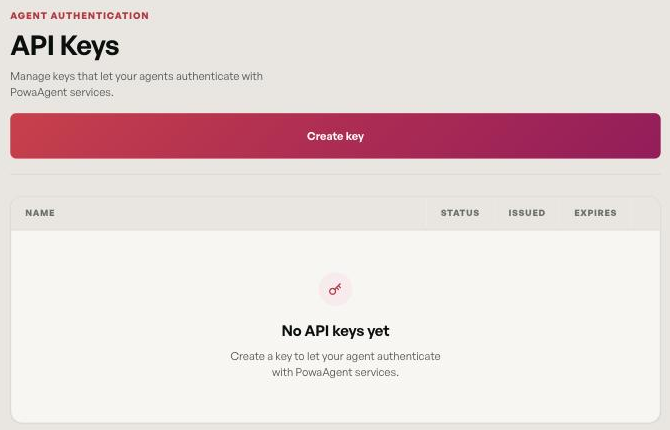
Create a key
- Open API key in the portal.
- Choose Create key.
- Enter a Key name, so you can recognize it later.
- Set Expires after (days). The default is 30 days, and you can choose anything from 1 to 365.
- Create the key.
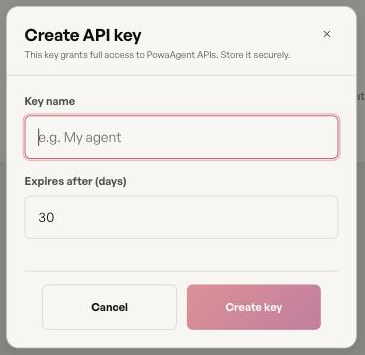
The key is shown once. Copy it now, because it won't be shown again after you dismiss the message.
One active key at a time
Your account can have one active key. To make a new one, revoke the current key first. The portal shows: "Revoke your existing active API key before creating a new one."
There is no separate rotate action. To rotate, revoke the old key, create a new one, and update your agents.
Revoke a key
Choose Revoke next to the key and confirm. The key stops working immediately, and any agent using it loses access.
Use a key
Send the key as a bearer token on every request:
Authorization: Bearer <your PowaAgent API key>
For the PowaAgent Skill, store the key in an environment variable or a .env file. The default variable name is POWAAGENT_API_KEY. See Skill setup and modes.
Keep your key safe
- Anyone with your key can spend from your wallet, within your source policy.
- Don't commit it to source control or paste it into shared files.
- If a key may have been exposed, revoke it right away and create a new one.
- Set spend caps, so a leaked key can only spend a limited amount.
When a key stops working
A request with a missing, expired or revoked key is rejected with 401 Unauthorized. Check the key's status and expiry date on the API key page, and create a new key if you need one.